


Live geosteering, shared instantly
Interpretation, mapping, correlation, and top picks update live for everyone.
PathFinder keeps you in zone.
Geosteering, mapping, striplog, and reporting.
One live workspace.
Interpretation, mapping, striplog, and reporting stay together from pre-spud to post-TD.


Realtime Collaboration
PathFinder keeps interpretation, map view, correlation context, and top picks live for the whole team.

Interpretation, mapping, correlation, and top picks update live for everyone.
Add unlimited read-only users with no extra cost, so stakeholders can follow live decisions.
Users can follow the same live project state on desktop or mobile across modern browsers. PathFinder also has a local desktop version for PC and macOS.
In-project chat keeps operational discussion in context while the data itself updates in realtime.
Geosteering Core
When interpretation, overlays, offsets, and control live in different places, teams lose time. PathFinder keeps them in one shared surface so decisions happen at operating speed.
Shared State
Live interpretation for every user
Team Control
Views, locks, and clean handoffs
Context Depth
Offsets and overlays in one decision view

Build beds and blocks with clear fault and dip-change logic, then refine with confidence as new data arrives.
Update targets, beds, faults, dip behavior, and contextual annotations directly in cross-section and wellpath views.
Overlay user interpretations and offset legs or wells from the same project so alignment is fast and obvious.
Use shared views, lock when needed, and hand off interpretation control cleanly when shifts or roles change.
Link multiple offset sources for side-by-side correlation across related wells and sections.
Switch X-axis modes between VS, MD, and THL, and run Y-axis depth context in TVD or SubSea, with TVT datum controls when needed.
Mapping Advantage
CRS-aware coordinates, basemaps, regulatory context, and project overlays sit on one live map surface — so teams check the decision faster.
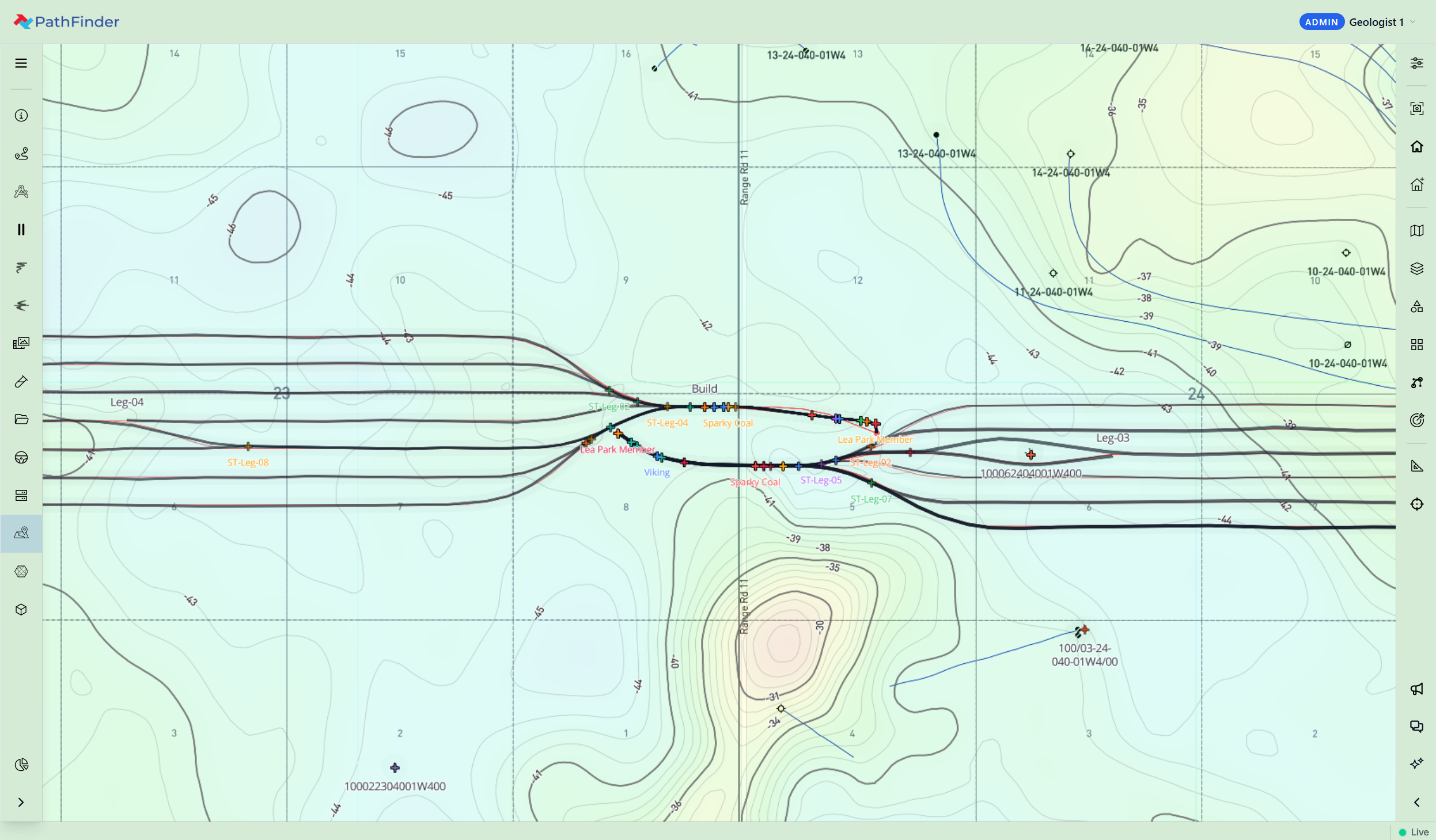
Move between Satellite, Satellite + Streets, Streets, Outdoors/Terrain, Light, and Dark views to match the decision in front of you.
ATS Townships, ATS Sections, ATS LSDs, NTS map sheets, Texas regulatory/public wells with trajectories, and Texas Survey/Abstract context are ready when the map opens, with CRS-aware alignment to project coordinates.
Layer surface locations, surveys, tops, plans, plus grid and shapefile overlays directly on your base map for faster spatial checks.
Measure distance and bearing instantly, inspect map details on hover, and run coordinate-aware checks in seconds, without breaking your workflow.
Stratigraphy
Well-to-well and leg-to-leg correlation with depth and survey rulers — MD, TVD, SubSea, Inclination, Azimuth, East, North, and DLS — so tops stay tied to the comparison you are making.
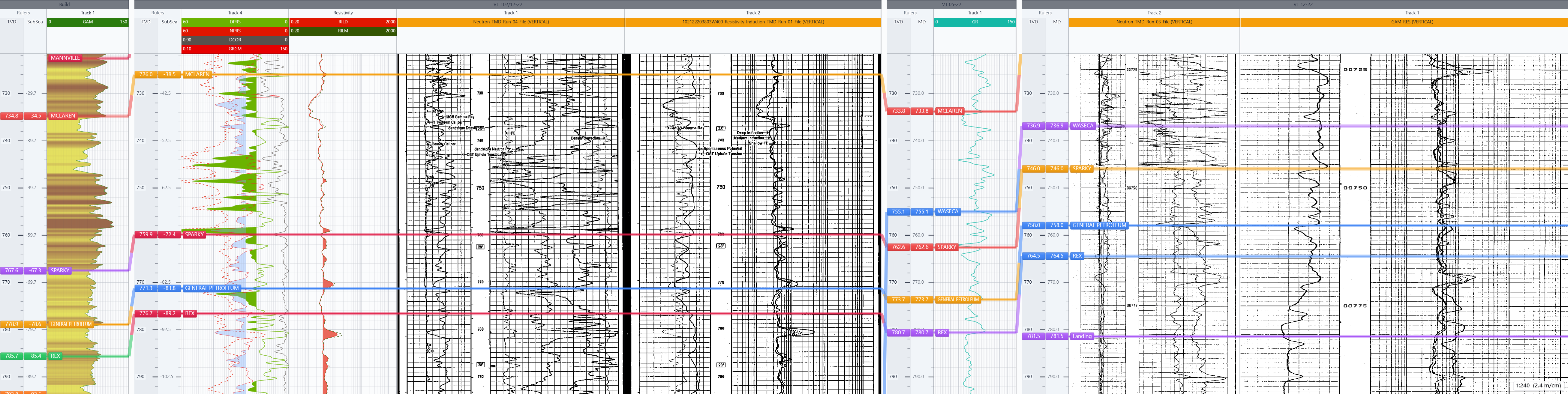
Correlate selected legs side by side in ordered columns, so geologists can compare structure and logs in one view.
Show and control depth and survey rulers — including Inclination, Azimuth, East, North, and DLS — so context matches the reference your team is working in.
Show one or more rulers per column and keep the comparison readable with the depth and survey labels you need.
Pick and adjust tops directly in the stratigraphy workflow while correlating logs, so interpretation updates stay tied to comparison.
Striplog
Good geos don't leave information on the table. PathFinder puts the striplog in the same live workspace as geosteering — geos, operators, and consulting teams see the same log as it is built, then print or share from PathFinder.
Geos, operators, and consulting teams see the same striplog as it is being built in PathFinder.
Drop cuttings photos into a photos track — shots you already take anyway — and keep them depth-linked with the log.
Stream logs and surveys over WITSML, with survey data on every ruler tick — including Inclination, Azimuth, East, North, and DLS — for context that matches the well.
Print scaled to PDF or continuous paper, then share and send the striplog directly from PathFinder.
Field Photos & Evidence
Drill cuttings, thin sections, and fluorescence photos stay with interpretation and reporting — not stranded in a camera roll.
Capture drill cuttings, thin sections, and fluorescence photos directly in PathFinder while operations are live.
Photos include well and section context, MD/TVD/SubSea labels, and a scale bar for measurement-ready review.
Use the built-in grain-size chart overlay to measure grain size during capture, then keep that measured reference in the final image.
Review rock descriptions and photo evidence in cross-section and wellpath views, depth-linked to interpretation, then carry that same evidence into final report PDFs.
AI Agent
An AI Agent built into PathFinder that uses your well context for setup, live operational questions, and geologic summaries.
Ask how to add a well, import data, and get moving without leaving PathFinder.
Get answers in seconds, from KB and frac port locations to drilled depth (meters or feet) and average speed.
Calculate interval log averages and generate clean geologic summaries, ready for reporting.
Complex Well + Multi-Leg Advantage
Keep pilot, build, lateral, and sidetrack in one well record, with interpretation and reporting carried through from start to finish.
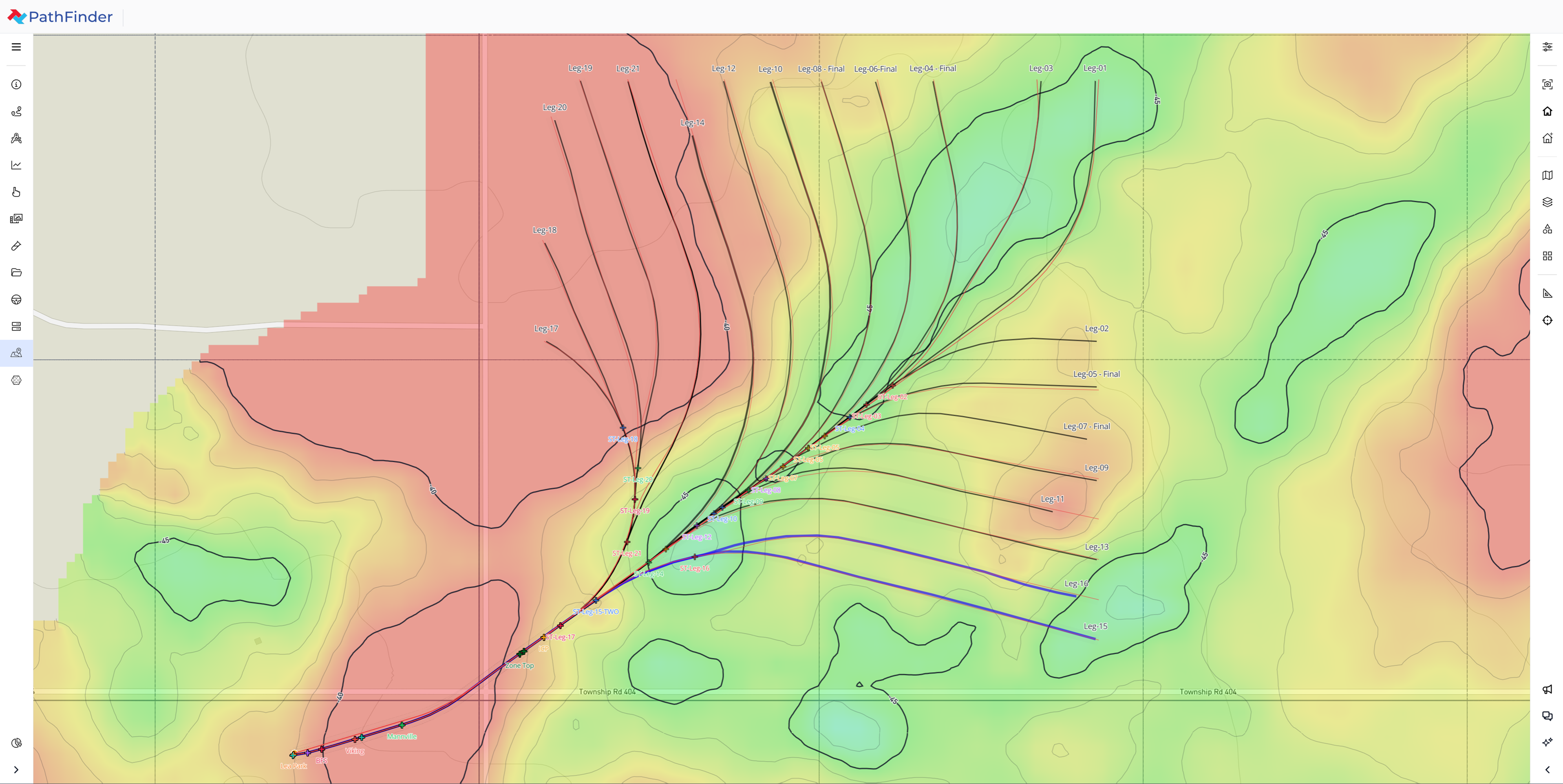
Keep every leg connected inside one well record, then generate one final PDF with one clear operational story.
Build outputs by leg with the exact content each audience needs, from Tops and Surveys to Photos and Reservoir Evaluation.
Create sidetracks directly from the Object Tree, then continue interpretation and reporting without rebuilding structure.
Overlay offset leg and well interpretations on the active well view for faster side-by-side correlation and alignment.
Customizable Workspace
Horizontal tracks usually sit top or bottom; vertical tracks sit left or right. In PathFinder, move tracks where you need them — some up, some down, some left, some right — so the geosteering window matches how you interpret.
Drag tracks to the positions that match your interpretation style — not a fixed vendor layout.
Place some tracks up or down and others left or right in the same geosteering window.
Arrange tracks around the signals you watch most, instead of adapting to locked top/bottom and left/right defaults.
Customize the view without leaving PathFinder or splitting interpretation across separate tools.
Drag & Drop Report Builder
One composition workflow for daily updates, periodic reporting, and final deliverables — with control over content and layout.
Report Composition
Builder Advantages
Report Sender
Templates, saved contacts and groups, attachments, and delivery confirmation — without leaving PathFinder.
Any Device
Geosteering, mapping, stratigraphy, striplog, and reporting stay in one browser workflow across Windows, macOS, iOS, and Android.
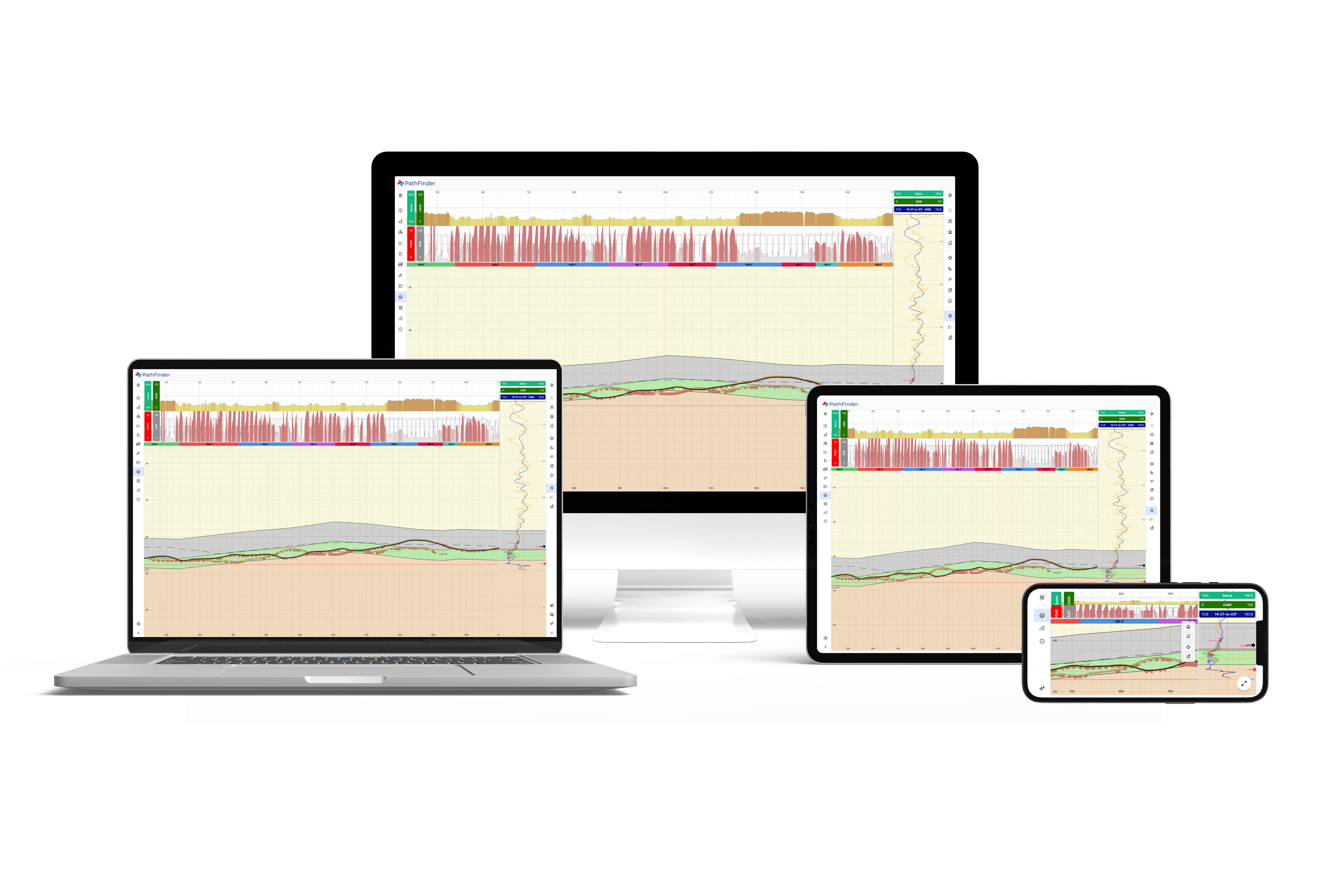
Run the same PathFinder workflow from desktop to mobile without changing systems.
Windows, macOS, iOS, and Android all connect to the same live project through the browser.
Use modern browsers to join, review, and collaborate with less rollout friction across teams and clients.
Commercial Advantage
One license starts with two users, scales as the team grows, and includes 24/7 support — so commercial friction does not block the well.
PathFinder runs in the browser, so teams can start faster across office, field, and client environments.
One license includes two simultaneous users in one team, then scales as operations grow.
Geosteering, mapping, reporting, collaboration, and AI are included together, not split into add-ons.
Operational data stays protected with encryption, role-based access, invite-only onboarding, and hardened controls.
Give clients and stakeholders live visibility without consuming active operating seats.
Need API connectivity for your workflow? We can provide access based on project requirements.
Lower total cost versus legacy stacks without giving up operational depth.
Frequent browser-delivered releases keep teams current without disruptive upgrades.
Free, round-the-clock support for live operations and critical reporting windows.
Next step
From live data intake to interpretation, mapping, striplog, reporting, and delivery, PathFinder keeps the operation connected.